

Before You Go—Let’s Boost Your Leads!
Join our community of successful HVAC and Plumbing contractors who trust Klutch Growth to enhance their online presence.
Klutch Growth Blog
HVAC Landing Page: How to Improve Calls From Paid Traffic

hvac landing page
Your HVAC ads landing page plays a pivotal role in the number of conversions you can get from your digital advertising campaigns. Now, there are a number of factors that combine to craft an effective HVAC landing page, but least, centrally, it has to align with the ad messaging.
The ad setup is the first piece of the campaign puzzle, while the landing page that welcomes your paid clicks is the other slice of the pie. It’s on your landing page that visitors decide whether they call, fill out a form, or leave. When that page doesn’t match what they searched for, even well-targeted ads can underperform. So a weak landing page can drain your ad budget while the targeting itself looks fine.
In this article, we will walk you through what an HVAC landing page should include for quality paid traffic. We’ll cover page structure, calls to action, trust signals, mobile layout, forms, campaign examples, and the tracking metrics you need to pay attention to to know what’s working or not.
What is an HVAC landing page?
An HVAC landing page is a focused web page built for one service, offer, or campaign, with a single action in mind. That action is usually a call or a form submission from someone who needs heating or cooling help.
Unlike a homepage that introduces your whole business, a landing page points the visitor toward one decision. A potential client that clicks an ad for AC repair sees AC repair, the phone number, and a clear next step, without the distraction of every other service you offer.
Your landing page is basically meant to support your paid and promotional traffic. You can use them for your Google Ads, social media ads, email offers, and seasonal promotions like spring tune-ups or winter furnace checks. They can also back other paid lead sources, like local service ads or display ads.
HVAC landing page vs homepage
Paid visitors often arrive with a specific need, and a homepage isn’t designed to immediately convert, rather to introduce them to your business. The homepage still has its place for general research, but it rarely converts a paid click as efficiently as a page built for the exact service.
Here’s how the two compare.
| Factor | Homepage | Landing page |
|---|---|---|
| Audience | Broad mix of visitors | Visitors from one campaign or service |
| Navigation | Full menu and many links | Stripped down, focused on one action |
| Services shown | All services at once | One service or offer |
| CTA focus | Several competing options | One primary action |
| Best use case | General research and brand discovery | Paid traffic and specific campaigns |
Consider a visitor who clicks an ad for emergency AC repair. That person should land on a page about emergency AC repair, not a general homepage that lists furnaces, ductwork, indoor air quality, and a company history. The more direct the match, the easier it is for them to act.
Why paid HVAC traffic needs a focused landing page
Paid traffic usually comes from a specific service need. Someone searching during a heat wave wants AC repair today, while someone planning ahead wants a replacement quote. The page should match the ad group, the service, the offer, and the service area that brought them in.
So the closer the page matches the ad, the more comfortable the visitor feels taking the next step. When the message shifts between the ad and the page, that small disconnect can give people a reason to leave.
Landing page experience also feeds into how paid campaigns perform. Search engines look at how relevant and useful the page is, which may affect ad quality and what you pay for clicks. We won’t promise specific rankings or costs here, though the page is one of the levers worth checking. If you’re running paid search, our guide to Google Ads for HVAC covers the campaign side in more detail.
Start with the search intent behind the click
Not every HVAC click carries the same urgency or the same stage of decision. The way people search has shifted, and that changes what a landing page has to do. Google reports that searches in its AI Mode now run about three times as long as traditional ones, with people describing a whole situation instead of typing a couple of keywords.
So instead of “AC repair,” someone might spell out the full problem, like a unit blowing warm air on a 95-degree afternoon. That longer phrasing carries clearer intent, which means the page that greets them can answer a specific need rather than a vague one.
The four intent types below tend to call for different pages:
-
Emergency repair intent
Emergency searches cover problems like an AC that stopped cooling, a furnace that won’t turn on, or a direct request for emergency HVAC repair. These visitors want help fast, so the page should lead with speed, current availability, a visible phone number, the service area, and quick trust signals. Anything that slows the call down works against you here.
-
Replacement or installation intent
Replacement searches include AC installation, furnace replacement, and HVAC replacement quotes. These visitors are weighing a larger decision, so the page should focus on estimates, financing options, warranties, the installation process, and proof from past jobs. They may not call right away, and that’s normal for this stage.
-
Maintenance intent
Maintenance searches cover AC tune-ups, furnace maintenance, and HVAC service plans. These visitors are usually planning ahead, so the page should highlight seasonal timing, what the service includes, membership or plan options, and easy scheduling. A simple booking step tends to suit this intent well.
-
Specialty service intent
Specialty searches cover ductless mini-splits, indoor air quality, humidifiers, and heat pumps. These visitors often want to understand the option before committing, so the page should explain the problem it solves, the benefits, the service details, and how to request a quote. Clear education usually matters more here than a hard push to call.
HVAC landing page checklist
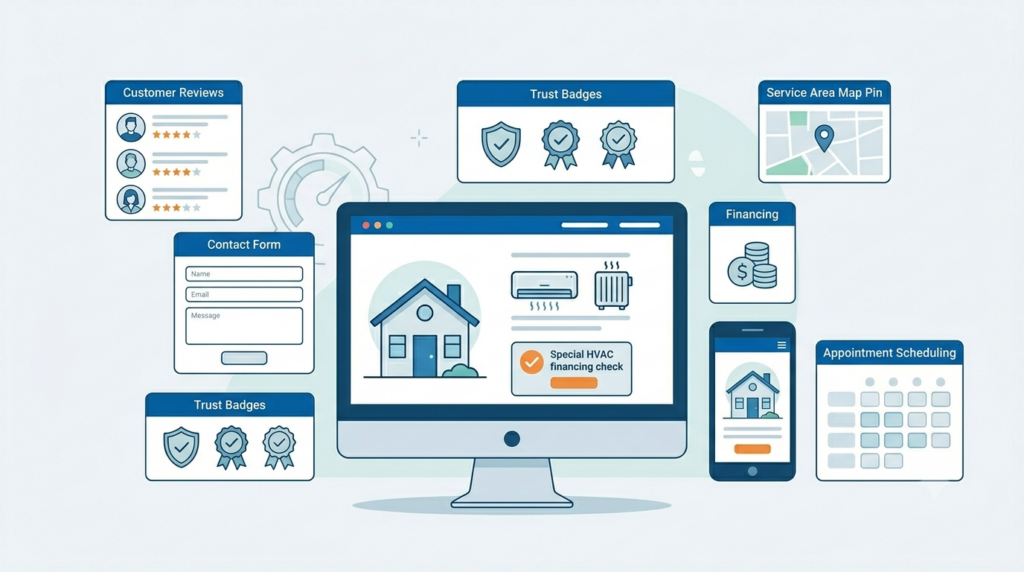
This is the part most worth getting right. A strong HVAC landing page tends to share the same building blocks, and each one has a job. Here’s what to include and why each item matters.
-
Clear service-specific headline
The headline should name the service, the urgency, or the offer right away. “Same-day AC repair in your area” tells a visitor they’re in the right place, while a vague “Welcome to our HVAC company” makes them work to figure it out. Match the headline to what the person searched for.
-
One main offer
A page that pushes one offer converts more cleanly than a page juggling several. Pick the single offer that fits the campaign, such as same-day AC repair, a free replacement estimate, a seasonal tune-up, or financing for qualifying installations. Competing offers split the visitor’s attention and slow the decision.
-
One primary call to action
The main call to action should match the service and the intent behind the click. Emergency pages usually lead with a call, while replacement pages often lead with a quote or estimate request. Pick one primary action and let everything on the page point toward it.
-
Strong ad-to-page match
The headline, offer, call to action, and content on the page should echo the ad that brought the visitor in. In 2026, the strongest ads tend to work as direct answers to a specific search, so the page has to deliver on that exact promise. When the ad says “free furnace inspection” and the page opens with a general services list, the visitor feels the mismatch and tends to leave.
-
Trust signals near the top
Trust signals help a first-time visitor feel comfortable contacting a company they’ve never used before. Place reviews, a licensed and insured note, years in business, technician photos, certifications, warranties, and local testimonials where people can see them early. Reviews tend to carry the most weight, and our guide on Google reviews for HVAC businesses explains why they belong near the top.
-
Local service area clarity
Visitors should be able to tell quickly whether the company serves their city or a nearby area. A short line naming the main service area and the surrounding suburbs usually does the job. Avoid stuffing the page with a long list of city names, since it reads as filler and crowds out the offer.
-
Mobile-friendly layout
Many urgent HVAC searches happen on a phone, often while someone is standing next to a unit that just quit. So the mobile version needs tap-to-call buttons, readable text, fast load time, short forms, and clean spacing. Our notes on HVAC website design go deeper on building pages that hold up on small screens.
-
Short form with only needed fields
A long form gives people a reason to abandon the page, especially on mobile. Keep it to what you actually need for follow-up, which usually means a name, phone number, city or ZIP code, the service needed, a preferred time, and an optional message. Every extra field you remove tends to lower the friction.
-
Real photos when possible
Real photos build more trust than obvious stock images. Show branded trucks, technicians in uniform, actual installations, and local job sites where you can. Visitors can usually spot a generic stock photo, and it quietly weakens the credibility the rest of the page is working to build.
-
Clear next-step section
A short section explaining what happens after someone calls or submits the form can ease hesitation. Tell them who responds, how soon, and what the first visit looks like. When people know what to expect, they’re more willing to take that first step.
-
Call and form tracking
Paid campaigns need tracking so you can see which clicks turn into real inquiries. Set up tracking for calls, form submissions, booked appointments, and lead quality, not just raw clicks. Without it, you’re left guessing about which campaigns and services actually produce useful contacts.
HVAC landing page examples by campaign type
A checklist tells you what to include. A page framework tells you how to arrange it for a specific campaign. Here are simple frameworks for four common HVAC campaigns, with the emphasis each one needs.
-
Emergency AC repair landing page
An emergency AC repair page lives or dies on speed. Lead with a headline about same-day or fast service, put a tap-to-call button high on the page, and show current availability along with the service area. Back it with a few urgent trust signals like quick response times, licensed technicians, and recent reviews, then keep the form short for anyone who would rather type than call.
-
Furnace repair landing page
A furnace repair page should speak to the no-heat problem and the worry that comes with it, especially safety concerns around a unit that won’t run. Lead with fast scheduling and a visible phone number, name the service area, and explain briefly what happens during the visit. A calm, clear page reassures someone who is cold and a little anxious.
-
HVAC replacement landing page
A replacement page serves a slower, bigger decision, so it should focus on estimates, system options, financing, and warranties. Walk through the installation process so the buyer knows what to expect, and include reviews from past replacement customers rather than general service reviews. This is the page where proof and clarity tend to matter most.
-
HVAC tune-up landing page
A tune-up page works best when it ties to seasonal timing, like a spring AC check or a fall furnace tune-up. Spell out what the visit includes, present any membership or maintenance plan options, and make scheduling simple. Framing the tune-up as a way to prevent a breakdown during the next heat wave or cold snap usually lands well.
Recommended HVAC landing page layout
A web developer or website designer can follow a standard order for most HVAC landing pages. The exact sequence may shift by campaign, though most pages move from the service need, to trust, to the offer, to the call to action, to proof, to questions.
- Open with a hero section that carries the service-specific headline, a line of supporting text, the phone number, the call to action, one trust signal, and a real image.
- Follow with a trust strip showing reviews, a licensed and insured note, the service area, and financing, warranty, or same-day availability where they apply.
- Add a problem and solution section that reflects the visitor’s specific service need.
- Present the offer with clear conditions and simple wording.
- Include a why-choose-us section backed by specific proof.
- List the services or problems covered for that campaign.
- Explain the process so the visitor knows what happens after they reach out.
- Show reviews or testimonials from relevant HVAC customers.
- Answer common objections in a short FAQ section.
- Close with a final call to action that includes the phone number and a booking option.
At Klutch Growth, we tend to keep this order flexible. An emergency page might pull the phone number and availability even higher, while a replacement page gives more room to financing and proof. The right sequence depends on what the campaign is asking the visitor to do.
Common HVAC landing page mistakes that waste paid clicks
Most wasted paid clicks trace back to a handful of fixable mistakes. These are the ones HVAC owners can usually spot on their own site.
-
Sending every ad to the homepage
A homepage built for general research rarely matches a specific paid search, so a focused landing page, kept separate from your organic HVAC SEO service pages, usually fits paid traffic better.
-
Using one page for every service
A single page can’t speak clearly to emergency repair, replacement, and maintenance at once, so the message gets diluted and the visitor has to hunt for what they came for.
-
Hiding the phone number
When the number is buried in a footer or hard to spot, urgent callers give up, so keep it visible at the top and make it tap-to-call on mobile.
-
Using a long form
Every extra field adds friction, and on mobile a long form is one of the fastest ways to lose a lead.
-
Failing to show reviews
Without visible social proof, a first-time visitor has little reason to choose you over the next contractor, and steady HVAC reputation management keeps those reviews fresh and easy to feature.
-
Not tracking calls and forms
If you can’t see which campaigns produce real inquiries, you can’t tell which pages are working, so you end up spending blind.
How to know if an HVAC landing page is working
A good-looking HVAC landing page and a working one are not always the same thing. The page that earns its budget is the one producing qualified calls, form submissions, and booked appointments. So judge it on practical signals rather than appearance.
- Calls and click-to-call taps show how many visitors reached out directly from the page.
- Form submissions matter most when they turn into real inquiries, not just completed fields.
- Cost per lead and cost per booked appointment tell you what each useful contact actually costs.
- Lead quality measures how many inquiries fit the services you actually offer.
- Mobile conversion rate matters because so much HVAC traffic arrives on phones.
- Call answer rate is a reminder that a missed call is a lost lead even when the page did its job.
Tracking these helps you see which campaigns and services produce useful inquiries, and which pages quietly underperform. If you want to go deeper on turning visitors into contacts, our guide to HVAC conversion rate optimization covers the wider process beyond the landing page itself.
How to improve an existing HVAC landing page
You don’t have to rebuild a page to improve it. A short audit, worked through in order, usually surfaces the changes that matter most.
- Match the headline to the ad that brings visitors in.
- Move the main call to action higher on the page.
- Shorten the form to only the fields you need.
- Add reviews where visitors can see them early.
- Add local proof, like service-area details or recent local jobs.
- Replace weak or stock photos with real ones.
- Clarify the offer so its terms are easy to understand.
- Explain the next steps after someone calls or submits.
- Set up call and form tracking if it isn’t already running.
Work top to bottom and you’ll usually fix the highest-impact issues first, before touching design or layout.
Quick HVAC landing page checklist
Here’s a short version you can scan against your own page.
- One clear service focus per page
- Headline and offer that match the ad
- Visible phone number with tap-to-call
- Short form with only needed fields
- Reviews and trust signals near the top
- Local proof and service-area clarity
- Fast, clean mobile layout
- A clear next-step section
- Call and form tracking in place
FAQs about HVAC landing pages
-
What is an HVAC landing page?
An HVAC landing page is a focused page built to turn visitors into leads for one HVAC service, offer, or campaign. It points the visitor toward a single action, usually a call or a form submission.
-
Should HVAC companies send Google Ads traffic to their homepage?
A focused landing page is usually the better choice for paid traffic, since it matches a specific search and points to one action. The homepage works better for general company research, where visitors want to explore everything you offer.
-
What should an HVAC landing page include?
A strong page usually includes a clear headline, one offer, a visible phone number, a short form, reviews, trust signals, local proof, a mobile-friendly layout, a short FAQ, and call tracking. Each element helps the visitor decide and act.
-
How many landing pages does an HVAC company need?
Separate pages often make sense for the campaigns that matter most, such as AC repair, furnace repair, HVAC replacement, tune-ups, emergency service, and financing offers. The right number depends on which services you advertise.
-
What is the best CTA for an HVAC landing page?
It depends on the intent behind the click. Emergency pages usually need a call CTA, while replacement pages often use a quote or estimate request.
-
Why is an HVAC landing page getting clicks but no calls?
Common reasons include a weak ad-to-page match, a hidden phone number, a long form, thin trust signals, a poor mobile layout, an unclear offer, or missing tracking. Checking these one at a time usually surfaces the cause.
-
Should an HVAC landing page have a form or a phone number?
Most pages should include both, because visitors prefer different ways to make contact. Some will tap to call, while others would rather submit a quick form and wait for a reply.
-
How should an HVAC company track landing page performance?
Track calls, form submissions, booked appointments, and lead quality, along with cost per lead and cost per booked job. Together these show which pages and campaigns produce useful inquiries.
In summary
An HVAC landing page should match the paid campaign that brought the visitor in, focus on one service or offer, build trust quickly, and make the next step easy. Those four things do most of the work.
So before raising the ad budget, review the landing page first. A page that answers the search and points clearly to a call or form will usually stretch the same budget further than more clicks aimed at a weaker page.
If your HVAC ads are pulling clicks but not enough useful calls, start with the landing page, the tracking setup, and the follow-up process before you increase the budget. Often a clearer page does more than a bigger spend.
At Klutch Growth, we work with HVAC and plumbing companies on this kind of thing, from PPC and web development to conversion tracking. If you’d like help working out whether the issue is the campaign, the page, the tracking, or the follow-up, you can reach us through our contact page. No sales pressure, just a clear read on where the gap is.
Recent Posts

August 31, 2026

June 19, 2026